

Use the Sepolia Testnet
Get test funds, check your Sepolia deployment and send a private payment.
Prepare a test account#
Use Ethereum Sepolia, chain ID 11155111, for public Fuyu development. Open the app and compare its selected Pool with the API configuration and contract reference. Follow the deployment difference described on the Networks page and confirm that the app and API agree before funding a new account.
Create a private Fuyu account using one of the available passkey or recovery methods. Save its recovery material and test that you can reopen the account before adding funds. Your connected external wallet funds or submits public transactions. Your private account holds the secrets used to discover notes and prepare proofs. You'll use both during this test.
Set up two Fuyu accounts for a private-payment test. After settlement, recover the receiving account in another browser session. That lets you check encrypted delivery and history recovery without relying on the sender's cache.
Get Sepolia ETH for gas#
Request test ETH for the external wallet that will submit deposits or direct withdrawals. Wait for the faucet transaction to confirm, then use the app to deposit into Fuyu. Until you make that deposit, the ETH remains in the external wallet and won't appear as a private balance.
Find Sepolia faucets in the Ethereum network reference. Options include Alchemy, Google Cloud and the Sepolia PoW faucet. Each provider has its own eligibility rules and rate limits. Google Cloud asks you to sign in, and the PoW faucet requires computational work. Check the provider's current page before requesting funds; avoid building a fixed faucet amount into your integration.
Leave enough ETH outside the Pool to pay for your next wallet transaction. A private ETH note cannot pay the gas of a transaction sent by your external wallet. Supported relay operations can have their submission gas sponsored. If you submit directly, your wallet needs a public ETH balance for gas.
Identify test assets by address#
The hosted configuration checked on 2026-10-02 lists native ETH, Aave test USDC, Aave test WETH and a static Aave WETH share. Fuyu identifies native ETH with the zero address; it has no ERC-20 contract. Independent chain reads found code for the other assets, with hashes matching the configuration.
This release uses Aave's Sepolia WETH test token at 0xC558…9a3c. The earlier generic Sepolia profile uses WETH9 at 0xfFf9…6B14. Read the full address in the selected deployment before funding. The symbol WETH won't tell you which token you have, and a mainnet or different Sepolia USDC token isn't automatically accepted.
| Asset | Sepolia identity | Decimals | How to obtain or use it |
|---|---|---|---|
| ETH | Native currency · protocol sentinel 0x0000000000000000000000000000000000000000 | 18 | Sepolia ETH faucet; fund gas or use the app's native deposit |
| USDC | 0x94a9D9AC8a22534E3FaCa9F4e7F2E2cf85d5E4C8 | 6 | Request from the Aave Sepolia faucet, then check the token address |
| WETH | 0xC558DBdd856501FCd9aaF1E62eae57A9F0629a3c | 18 | Request from the Aave Sepolia faucet; this is the release's wrapped asset |
| stataEthWETH | 0x162B500569F42D9eCe937e6a61EDfef660A12E98 | 18 | Use the approved Aave share route; its underlying is the WETH above |
Get the supported ERC-20 test tokens#
Open the Aave interface, enable testnet mode and choose the Sepolia V3 market. Use its Faucet tab to request the asset you need, as described in Aave's testing guide. Once the request confirms, check the token's contract address and balance in your wallet.
After getting tokens, check the route you plan to use. A faucet can mint tokens while a vault has no room for more deposits or a swap lacks liquidity. Request a current quote and read the preflight result. The older USDC static-aToken deployment plan recorded zero deposit capacity; use the active WETH route's settings rather than substituting that USDC venue.
Verify the network before funding#
Read the configuration and compare it with the chain before sending a transaction. This example uses the protocol repository's ethers version to check the chain ID, runtime hash and Pool domain against the API response. Also compare those values with the release manifest or app build you trust; the API must not get to choose your trusted contracts by itself.
Tenderly supplied the independent RPC reads for the documentation check. Expect public endpoints to throttle some requests. Limit your retries, and stop to resolve a failed read instead of skipping the contract check.
import { ethers } from 'ethers'; // repository: ethers 5.8.0; run as an ES module
const config = await fetch('https://api.fuyu.xyz/api/queue/config')
  .then(response => {
    if (!response.ok) throw new Error('Configuration unavailable');
    return response.json();
  });
const provider = new ethers.providers.JsonRpcProvider(
  'https://sepolia.gateway.tenderly.co'
);
const network = await provider.getNetwork();
if (network.chainId !== 11155111 || config.chainId !== network.chainId)
  throw new Error('Wrong chain');
const block = await provider.getBlockNumber();
const code = await provider.getCode(config.poolAddress, block);
if (code === '0x' || ethers.utils.keccak256(code) !== config.poolRuntimeCodeHash)
  throw new Error('Pool runtime mismatch');
const pool = new ethers.Contract(config.poolAddress, [
  'function domain() view returns (uint256)',
  'function VK_HASH() view returns (bytes32)'
], provider);
if ((await pool.domain({ blockTag: block })).toString() !== config.domain)
  throw new Error('Pool domain mismatch');
console.log({ chainId: network.chainId, pool: config.poolAddress, block });
// Next: compare every identity with your trusted release manifest.
Test a deposit, payment and withdrawal#
Start with a small deposit through the app. For an ERC-20, check and approve the requested spender and allowance before depositing. If you are testing a plain transfer, use the Portal flow and verify its address and invoice. A regular token transfer to the shared Pool won't create the private note you need.
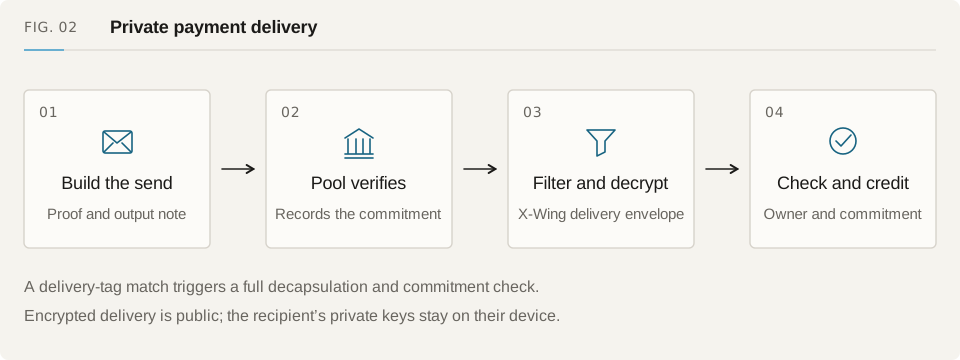
Wait for the deposit transaction and history scan. Check that your note has been recovered and can be spent under the source policy. Send it to your second private account and confirm the sender's change. Open the receiving account independently to check the credited note. Then withdraw to an external wallet and compare the public token amount with the amount you expected.
Keep the transaction hashes and operation records until recovery finishes. If submission times out, look up the original transaction and nullifiers before retrying. An HTTP success tells you the request was accepted; you still need to check the mined transaction and recover the private balance.
Troubleshoot testnet setup#
Find the step that failed, then check the corresponding state below. Look up an existing deposit or payment before starting another one so a recovery delay doesn't become a duplicate transfer.
| Symptom | Check | Next action |
|---|---|---|
| Wallet asks for another network | eth_chainId and selected app chain | Switch to Sepolia and reopen the review |
| Token balance is absent | Token contract address and decimals | Get the token listed by the selected deployment |
| Deposit mined, private balance pending | Recovered note and effective policy coverage | Sync the original operation and follow its pending state |
| Quote unavailable | Allowed route, capacity, liquidity and contract settings | Resolve the quote error before proving |
| RPC history read fails | Log-range limits and deployment-block access | Use a suitable independent RPC with smaller ranges |
| Deployment mismatch | Pool, domain, runtime hash and artifact manifest | Match the app and configuration before funding |