

Run Infrastructure
Run deployment, relay and recovery services without holding private account secrets.
Services around the Pool#
Deploy the contracts and distribute their authenticated proof files. An app operator can also serve configuration, submit relay transactions, collect Portal deposits and store encrypted backups. An auditor uses their own chain source and trust data.
Give each service only the inputs it needs. The relay uses public proof data without spend secrets. A backup service can store ciphertext while account history stays private.
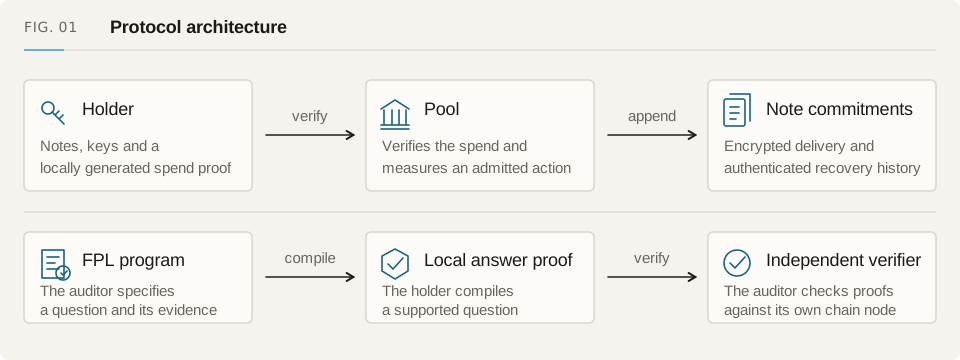
Deploy the contracts and record the hashes needed to authenticate them.
Relayers & RuntimeSubmit prepared proofs, check transaction status and finish pending settlement.
Service-independent RecoveryKeep the app, proof files and deployment data users need during a service outage.
Contract AddressesFind each Sepolia contract, what it does and which Fuyu deployment uses it.
Proof Artifacts & Verification KeysDownload, host and check the files used to prove private spends and holder disclosures.
Local Development & TestingStart a private fork, run the API and app, and test against the contracts from your own build.
Choose what to operate#
| Role | Inputs | Keep working |
|---|---|---|
| Deployment operator | Reviewed contracts, network profile and authorities | Runtime and proof-file authentication |
| Relayer | Public request, deployment configuration and gas | The approved request and transaction status checks |
| Portal keeper | Published invoice witness and delivery data | Credit to the invoice's recipient |
| Artifact host | Authenticated proving and verification files | Download digest checks |
| Recovery host | Static bundle and a holder-selected RPC | Account access and the original exit tools |
| Auditor | Program, answer and independent finalized history | Verification of the stated question |
Start with a fork#
The repository runtime starts a disposable fork and development API. Use it for development and acceptance tests. Run contract and proving work on the provisioned Linux environment.
To serve another network, review its assets, external contracts and proxy implementations with the routes and runtime profile. After deploying the Pool, test the app and relayer against that deployment too.
Prepare for interrupted operations#
Retain requests and transaction hashes after failures. Watch reserved actions that need finalization and keep a reproducible static recovery bundle. Back up the payment ledger separately from encrypted account backups.
Show whether a failure came from the service or the chain, and offer the next completion or exit step available for the saved operation.