

Send Your First Payment
Send a private payment and check the recipient's note and your change.
Choose a recipient#
Open Send and enter the recipient's private receiving address or another receiving route the app supports. The private address includes the public keys needed to encrypt the recipient's new note. They can recover it when they next open their account.
For an unregistered 0x wallet, choose the claim-link or public payment flow. Those flows use different approvals and reveal different information from a payment to a private address.
Review the payment#
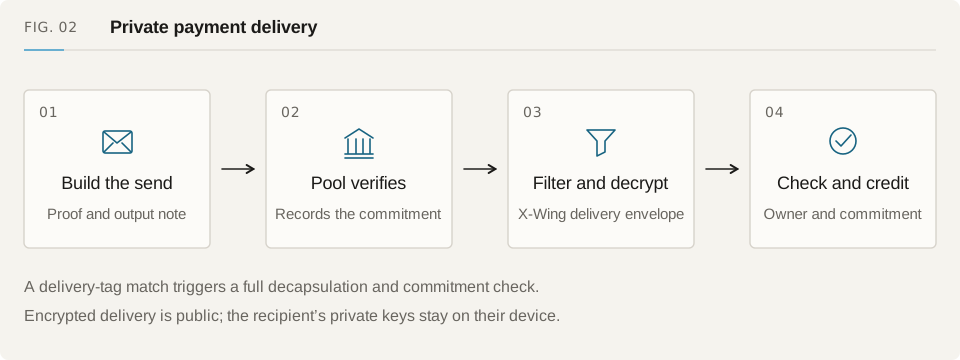
Check the asset, amount and destination, including the fee and any controller approval. The browser selects your notes and proves that you own them, that they belong to the note tree and that the payment conserves value. It creates the recipient's output and your change without sending note secrets to the relayer.
Each input note is spent in full. If you pay only part of its value, the remainder becomes a new change note. Leave the browser open while it proves, and save the operation's recovery state before sharing its authorization.
Submit and wait for confirmation#
Send the prepared operation through the relayer or a direct-wallet path supported by the app. The Pool checks the proof and approvals, records the consumed nullifiers and appends the outputs. The receiving account decrypts the delivery and checks that its note matches the recorded commitment.
Check the transaction receipt and account history after submission. If HTTP times out, look up the original transaction and its nullifiers before retrying. The transaction may already have succeeded.
Check the result#
Look for your change note and the recipient's payment note. Their private openings hide the recipient and amounts, but the transaction still publishes commitments, nullifiers and submission timing.
For your first test, use two accounts you control on the same development deployment. Open the recipient in a fresh browser and check that it finds the payment without using the sender's local data.