

Build on Fuyu
Add private payments, asset operations and recovery to your application.
What you can build#
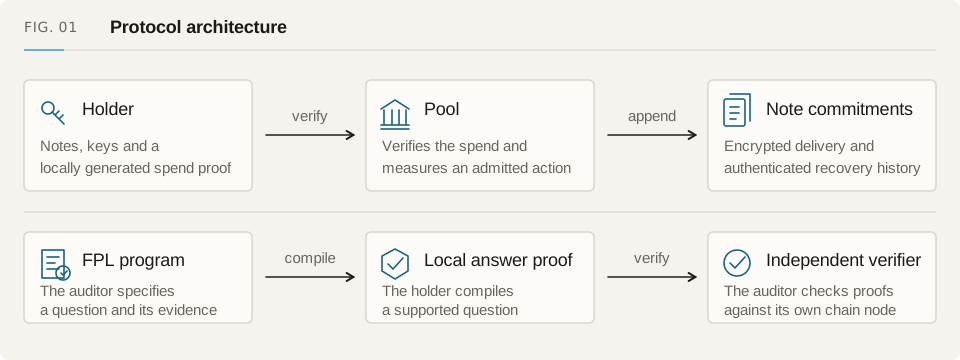
Fuyu stores funds in a shared Pool. Your client proves spends and encrypts recipient notes; the chain settles them. Applications can also use approved adapters for public venue calls while keeping the result in private notes.
The protocol checks note ownership and value conservation. Your application handles its service logic and interface, chooses a deployment and stores the data needed to resume interrupted operations.
Pay a private receiving address and return any remaining value as change.
Payment LinksGet paid from an external wallet or send a claim link to an unregistered recipient.
Batch PaymentsPay several recipients or combine small notes in one router transaction.
Asset OperationsSwap assets or enter vaults through approved routes, then recover the output in private notes.
SwapsUse an approved Uniswap route and receive the returned tokens as a private note.
Earn & Vault PositionsSupply assets to a vault, track your private shares and use its redemption path.
Withdrawals & ExitsWithdraw to a public wallet and recover any private change after confirmation.
Migrate to FuyuWithdraw from another privacy protocol into a new Fuyu note on the same chain.
Multi-step Action PlansCombine approved swap and vault steps into one action with a final output minimum.
Selective DisclosureProve a supported fact about your account without sharing its private history.
Account & Payment RecoveryReopen your account or finish an interrupted payment using its saved authorization.
Safe TreasuriesUse private notes that also require approval from your Safe.
Fuyu featuresFind the guides for account setup, payments, DeFi, approvals and recovery.
Receiving names and addressesChoose a private address, name, registered wallet address or deposit portal for your payer.
Pay wallets with claim linksSend to someone without a Fuyu account, set a claim deadline and recover a claim that was interrupted.
History and reconciliationRead account activity, check pending operations and understand what a history export contains.
Token balances and USD valuesKeep token amounts precise, separate checking funds and show USD estimates without hiding missing prices.
Disclosure consent and policiesReview an audit request, share a supported proof and understand what policy grants can do.
Spending wallets and Safe approvalsSet up wallet B or Safe approvals and resume an operation without changing what was signed.
Encrypted recovery filesSave history and pending operations, restore them on another device and handle backup conflicts.
Gas sponsorship and fee reviewsSee who pays gas, which operations are sponsored and how fees affect a public payout.
Choose a starting point#
| Feature | Use it for | Result |
|---|---|---|
| Private payments | Pay a private receiving account | A recipient note and any private change |
| Payment links | Get paid from external or unregistered wallets | Portal credit or a controlled claim |
| Batch payments | Payroll, multi-recipient sends and consolidation | Spends that each authorize their own inputs and outputs |
| Asset operations | Use approved swap and vault routes | A measured output note or private ticket |
| Disclosure | Let a holder choose to prove an account fact | A verified answer to a supported question |
| Recovery | Change devices or finish an interrupted operation | Recovered state and the original authorization |
| Swaps and Earn | Hold tokens or shares through approved venues | The tokens or shares actually returned |
| Migration | Withdraw from a source into Fuyu | A new note on the same chain, with public linkage |
Show the next action#
Track drafts, prepared proofs and pending approvals through submission, confirmation and note recovery. If a submission times out, show that its outcome is unknown. Two-stage actions also need a reserved-output state and a way to finalize it.
A payment status view can use public transaction records. Keep private witnesses on the holder's device; the backend does not need a plaintext account history to report transaction status.
Start with one payment#
Choose one supported asset and deployment. Send a payment, confirm its transaction and recover the recipient's note in another browser. Once that works, add controllers, more routes or service billing.
Use the guides below to check what each flow needs. An adapter's presence in the repository is not a supported route on every network; availability comes from the deployment you are integrating.