

Fuyu features
Find the guides for account setup, payments, DeFi, approvals and recovery.
Start with your private account#
Open a Fuyu account to scan its notes and prepare proofs in the browser. The account holds encrypted access material and receiving keys for one Pool. Your funding wallet, recovery wallet and spending controller each have a separate job. When someone connects a wallet, keep the private account they already opened.
The same notes can fund a payment, a swap or an Earn deposit. What happens next depends on the asset: receiving vault shares gives you shares, and you redeem them separately to get the underlying token. Recovering account keys restores access to notes. You still need to pass source checks, meet venue conditions and collect any controller approvals.
Choose a guide#
Start with the task you want to build. Then check that your network enables the required assets, routes and contracts, and that your app build allows transactions.
| Task | Feature | What to check |
|---|---|---|
| Open or recover an account | Passkeys, paper words and optional wallet A recovery | Choose account access separately from funding and spending approval |
| Receive payments | Full private addresses, configured names and wallet receiving registration | Look up the descriptor and check it again before sending |
| Pay someone without a Fuyu account | Recipient-bound claim link | Use the named wallet and explain the deadline and public claim terms |
| Pay several people | Private sends, batch payments and Combine | Check input limits and save pending authorizations |
| Use DeFi | Swaps, Earn, enabled vault routes and action plans | External calls are public; check settlement before crediting outputs |
| Require another approval | Wallet B or the supported Safe-controller flow | Ask the controller to approve this operation under its owner policy |
| Reconcile activity | Authenticated timeline and encrypted recovery files | Check history coverage; a suffix is not a complete ledger |
| Answer an audit request | Holder-run proofs and independent verification | Get the holder's consent and finalized evidence for a supported positive claim |
All feature guides#
The feature IDs below come from the product specifications. They cover account setup, receiving, payments, DeFi, approvals and recovery. Each link opens the guide for that task, including the network requirements and what to do when a step cannot continue.
| Feature IDs | Task | Guide and requirements |
|---|---|---|
| ACC-01, ACC-08 | Account settings and saved operations | Account recovery · check the account revision and pending update |
| ACC-02, ACC-03, ACC-04 | Passkeys, paper recovery and key rotation | Passkeys and backup access · move earlier funds after changing keys |
| ACC-05, ACC-06, ACC-07 | Account recovery, accounts without wallet A and earlier accounts | Recovery · choose the account and keep its earlier keys |
| ACC-09 | Browser wallet and WalletConnect | Connect to Fuyu · keep account access and wallet roles separate |
| APR-01 | Approval wallet B | Spending approvals · use B's EOA or supported contract signature |
| APR-02, APR-04, APR-05 | Safe owner review, passkey owners and saved proposals | Safe approvals · use a supported Safe deployment and owner types |
| APR-03 | Safe treasury funding | Safe treasury · check allowance, account and owner threshold |
| RCV-01, RCV-02 | Receiving names and wallet-address registration | Receiving · configure a name registry; 0x registration is public |
| RCV-03, RCV-04 | Reusable deposit addresses and deposit options | Receiving / Get funds · check portal limits and recovery terms |
| PAY-01, PAY-02 | Send and claim a recipient-bound link | Claim links · use the named wallet, respect its deadline and save recovery |
| PAY-03 | Public escrow for an unregistered recipient | Claim-link alternatives · requires a separate escrow deployment; all payment terms are public |
| PAY-04, PAY-05 | Batch payments and Combine | Batch payments / Asset operations · check router support and input limits |
| PAY-06 | Send options and contacts | Private payments · check the recipient; contacts stay in this browser |
| DEFI-01, DEFI-02, DEFI-03 | Earn venues, Flex/Term and tickets | Earn · check routes, share tokens and claim windows |
| DEFI-04 | Async vaults and tickets | Asset operations · check whether this test-only route is enabled |
| DEFI-05 | Ordered action plans | Action plans · use the fixed adapter and final output minimum |
| DEFI-06 | Swaps | Swaps · check pair, quote, fee and minimum output |
| DEFI-07 | Two-step action settlement | Asset operations · finalize reserved outputs after execution |
| WDR-01, WDR-03 | Wallet withdrawals and their options | Withdrawals · check the public recipient, token and net payout |
| WDR-02 | Source-revealing exit | Withdrawals · the deposit source becomes public |
| OPS-01, OPS-02, OPS-03, OPS-04 | Earlier operations, interrupted sends and attention states | History and reconciliation · check the original operation before retrying |
| CMP-01 | Source screening | Get funds · wait for deposit age and publisher coverage |
| CMP-02, CMP-03, PRF-01, PRF-02, PRF-03 | Audit questions, programs, answers and verification | Disclosure · use supported holder-run proofs and the matching request |
| SYS-01 | Encrypted backups | Recovery files · saves history and included pending journals |
| SYS-02, SYS-03 | RPC setup and recovery without the service | Infrastructure recovery · use a checked RPC and the deployment's recovery artifacts |
| SYS-04 | Exit an earlier Pool | Recovery · older accounts can restrict funding and new actions |
| V5-not-live | Unavailable pages and design placeholders | Deployment checks · a visible page does not mean bridge, borrowing, membership or equity transactions work |
Set up access and receiving#
The app can create a Passkey plus paper-recovery account, a paper-only account, or an account with optional wallet recovery when the deployment supports it. Several passkeys can open the same account and earlier keys. Removing one requires a key change and moves to protect earlier funds. Include new receiving instructions and late payments to old keys in your recovery flow.
The full private address works without a name. Names need a configured registry, while receiving through a 0x wallet address requires a public registration. Reusable deposit addresses accept ordinary wallet or exchange transfers under fixed invoice terms. Choose the method that fits the payer, and explain what it publishes and how uncredited money is recovered.
Build payments, streaming and DeFi#
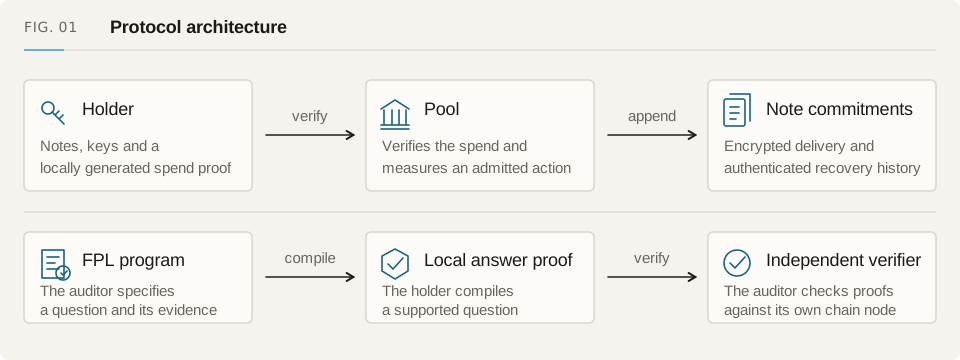
Private send creates encrypted outputs for the recipient. Claim links let a named wallet claim before a deadline, even if its owner has no Fuyu account. Batch payments put several proved steps into the configured router flow. Payment-session streaming uses signed cumulative vouchers and the session-payment core. If your app schedules private sends instead, it must handle timing, balances and approval for each send.
For DeFi, choose an enabled adapter and the input/output asset pair it supports. The proof includes the input, minimum output, execution context and controller. A two-stage action needs a later append of its reserved outputs; a one-transaction action settles them together. Check route admission, liquidity and withdrawal windows before offering a venue. An adapter in the repository may still be disabled on your network.
Recover interrupted work and review disclosure#
Save pending authorizations in encrypted storage before they leave the browser. If a wallet, relay or page stops responding, look up the original operation in authenticated history. Keep checking an unknown result. A second proof can leave two authorizations able to spend the same inputs.
Audit answers need a separate review. The holder reads the questionnaire, checks what it reveals and generates supported proofs locally. A payment, receiving name or balance does not grant access to private history. Anyone receiving an exported answer should verify it against the request and finalized snapshot.
Check your network before funding#
Open the contracts and testnet guide. Match the chain ID, Pool address, domain, deployment block, runtime code and proof artifacts. Check token support, action routes, name registry, relay fees and Safe support for that Pool.
These guides cover the client and protocol implementation. Feature availability is set by the deployment: a read-only preview cannot transact, a disposable fork is a test environment, and a feature may need additional configuration on the public app. Mainnet deployment, physical-authenticator certification and independent audit status need their own release records. Check those records before choosing a production environment.