

Independent Verifier
Verify an exported audit answer against your own finalized chain history.
Gather the verifier inputs#
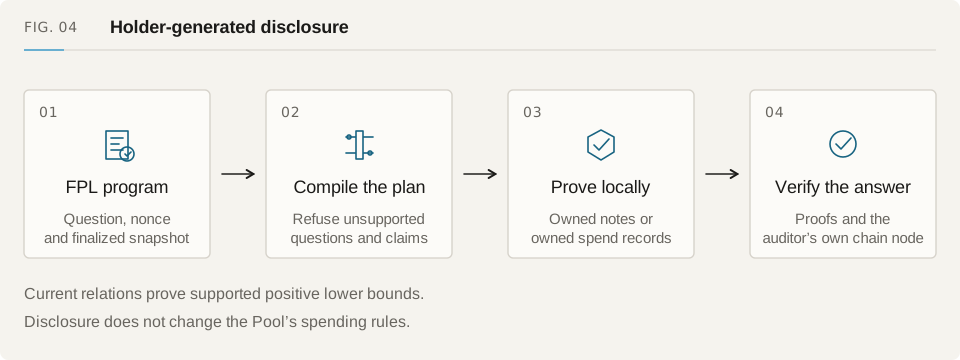
Provide the auditor's FPL program, holder's exported answer, trust file, verification keys and an RPC endpoint. The verifier checks the chain and Pool, then rebuilds complete finalized history from the deployment block.
Read chain history independently of the holder. A wallet checkpoint or balance export can omit events, so it cannot replace the audit history used to check the proof.
Choose trusted deployment data#
Record the expected Pool and cryptographic contracts, receiving directory runtime, deployment block and verification-key hashes. The deployment-export tool writes this data for the deployment it inspects. Keep the trust file separate from the holder's answer.
Obtain expected hashes through a reviewed source. Accepting whatever code the RPC returns on its first request would let that same RPC decide which deployment you trust.
Run the verifier#
Supply the program, answer and trust file as separate inputs. Set your RPC and receive-directory address and code hash for that deployment. The command below uses the CLI's current flags.
For browser verification, open verify-audit-answer.html in the app distribution.
# Run from the protocol checkout with reviewed deployment inputs.
node --experimental-strip-types \
  apps/privacy/runtime/verify-audit-answer.cjs \
  --program review.fuyu --answer answer.json --trust trust.json \
  --rpc "$FUYU_AUDIT_RPC_URL" \
  --directory "$FUYU_AUDIT_DIRECTORY" \
  --directory-code-hash "$FUYU_AUDIT_DIRECTORY_CODE_HASH"
Read a verified answer#
Verification confirms the compiled statement at the selected finalized snapshot and within the relation's capacity. Later transactions can change the account balance. FPL questions outside the compiler's subset still need a different proof backend.
The repository uses test-only relations and files. Include that key status with exported answers; production key generation and security review are still pending.
- Read the subject's registered key generations independently.
- Reject incomplete history, a wrong deployment or changed keys.
- Keep the input-participation qualification on spend-record results.
- Label verified Yes answers separately from local previews and rejected questions.